receipt-splitter
Website to upload, detect extract items in a receipt using PaddleOCRv5+Gemma3n Model, great for splitting bills
Receipt Splitter
A web applications for users upload their receipts, and detect & extract items using PaddleOCRv5+Gemma3n Model, great for splitting bills.
⭐ Try a Live Demo (Limited Computing Resources) ->
https://receipt-splitter-paddleocr-gemma3n.onrender.com
Calculations are based on Malaysian tax culture which typically includes Sales Service Tax (SST) and/or Service Charge.
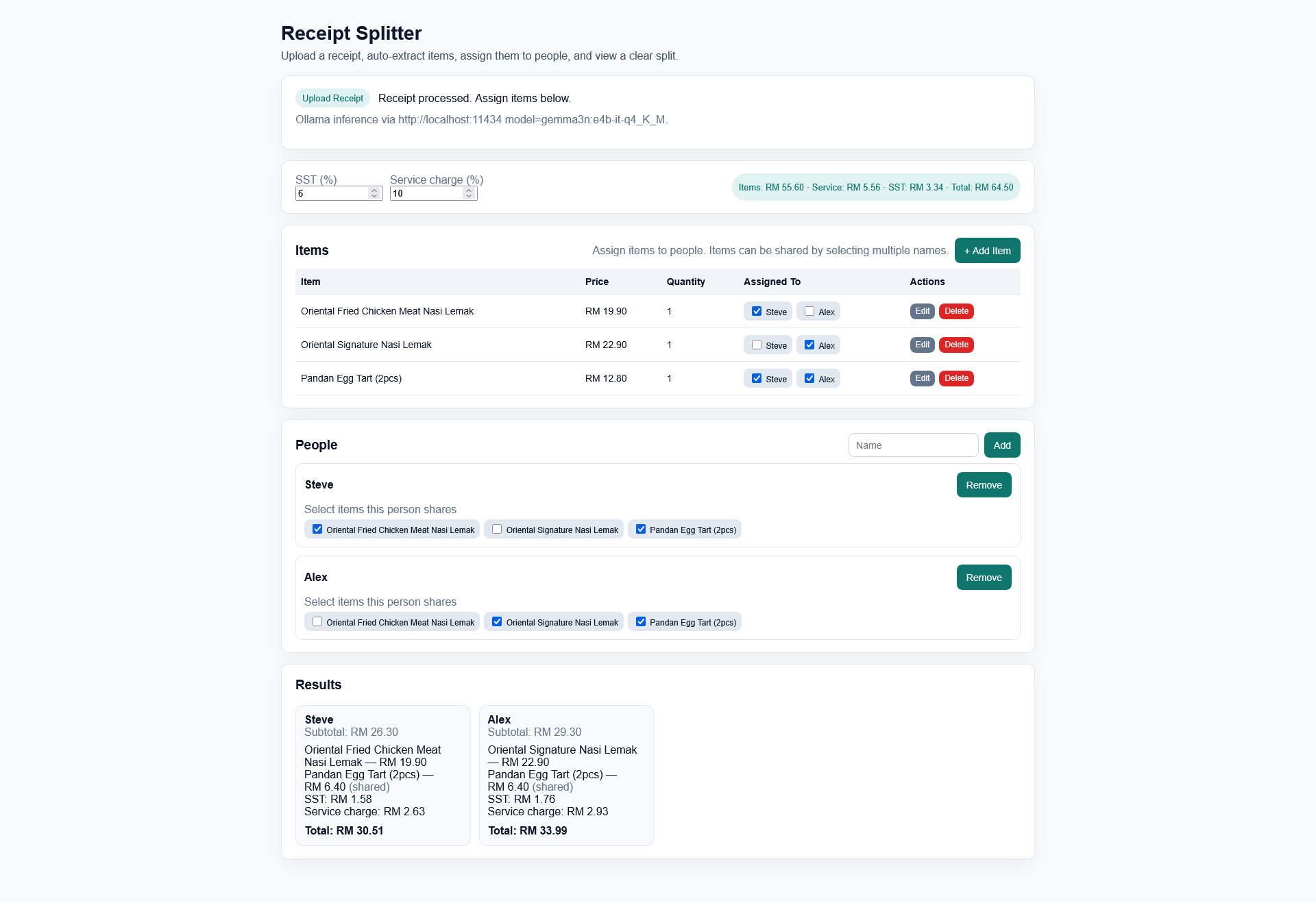
About this Project
I frequently help calculate split bills for my peers. For some reason, I still use a calculator app and manually send the breakdown of each user’s cost by text. With this app, I can simply screenshot the breakdown easily and send to a groupchat.
This project utilises PaddleOCR and local-LLM like Gemma3n for efficient text detection, recognition and field extractions.
AI Usages
The project was vibe-coded with Cursor with some minor backend code written by me. It took slightly less than a day to complete this project as I just wanted a quick experiment and play around with AI Coding tools.
You can locate the starter prompt I used to generate the MVP Skeleton Code via Cursor in
cursor_prompt.md(Generated using ChatGPT)
Changelog
- v0.1.0
- Base Application, Local Inference via Ollama
- v0.2.0
- Added Cloud Inference using Google GenAI and PaddleOCR API
- Minor UI Enhancements for Mobile Browsers
- Modal Dialog Form for Adding Items
- Favicons, Link to GitHub Buttons
- Function to Rate Limit API Calls
How it Works
-
Simply open the webpage
index.htmlin a browser and upload a receipt image (Supports: jpg, jpeg, png). -
The image is passed to a backend FastAPI Server which performs the following:
- OCR Text Detection
- OCR Text Recognition (Returns a JSON Output)
- Text Extraction (Using a Local LLM like
gemma3n:e4b) - JSON Formatting Output
-
The structured data is sent back to the webpage. You can then:
- Add, edit, or delete items.
- Add or delete people to the split.
- Assign each item to one or more people (costs are divided evenly).
- View a summary breakdown of who owes what, with SST and service charges included.
Pre-Requisites
Before you begin, ensure you have the following installed and set up:
- Python 3.12+
- Ollama: The backend relies on a locally running Ollama instance to serve the language model.
- Download and install Ollama
- Pull the default model required for parsing:
ollama pull gemma3n:e4b-it-q4_K_M
ollama run gemma3n:e4b-it-q4_K_M
(You can configure a different model in the
.envfile, but the prompt is tuned for this one.)
Local/Cloud Set-Up Guide
A. Backend (FastAPI Server)
- Install Dependencies:
Install all required Python packages, including FastAPI, PaddleOCR, and others.
pip install -r requirements.txt -
Configure Environment
Create a
.envfile in the project root by copying the example file.env.example. At a minimum, ensureOLLAMA_BASE_URLpoints to your running Ollama instance.For Cloud Inference, ensure you have a Gemini API Key from Google AI Studio and a PaddleOCR Token & URL from Baidu AI Studio.
You can find more environment configuration info in the section below.
- Start the Server:
Run the FastAPI server using Uvicorn. It will be available at
http://localhost:8000. The--reloadflag automatically restarts the server on code changes.uvicorn main:app --reload --port 8000The first time you run this, PaddleOCR will download its models, which may take some time.
B. Frontend (React UI)
- Open the File:
Simply run
npx serve ./siteand openhttp://localhost:3000in your web browser.No build step or
npm installis required. It uses React via a CDN and transpiles JSX in the browser.
The application will attempt to connect to the backend at http://localhost:8000.
Environment Configuration (.env)
Create a file named .env in the root of the project to configure the backend. You can leave the defaults for a standard setup.
# --- Local / Cloud Deployment ---
# "true" for Local Inference, "false" for Cloud Inference.
LOCAL_HOST_ENABLED="false"


# --- Cloud Configuration ---
# API Configuration for Google GenAI
GEMINI_API_KEY=<GEMINI_API_KEY>
CLOUD_MODEL="gemma-3-4b-it"

# API Configuration for Google GenAI
PP_AI_STUDIO_URL=<PP_AI_STUDIO_URL>
PP_AI_STUDIO_TOKEN=<PP_AI_STUDIO_TOKEN>


# --- Ollama Configuration ---
# The base URL of your running Ollama instance.
OLLAMA_BASE_URL="http://localhost:11434"

# The model to use for receipt parsing. Make sure you have pulled this model.
OLLAMA_MODEL="gemma3:4b-it-q4_K_M"

# Timeout in seconds for the call to the Ollama API.
OLLAMA_TIMEOUT_S="60"


# --- File Paths ---
# Path to the prompt template file.
PROMPT_PATH="prompt.txt"


# --- Logging ---
# Log level (DEBUG, INFO, WARNING, ERROR, CRITICAL). NOTSET disables it.
LOG_LEVEL="INFO"

# File to write logs to.
LOG_FILE="server.log"


# --- PaddleOCR Model Configuration ---
# You generally do not need to change these.
# See PaddleOCR docs for available models.
PADDLE_DET_MODEL="PP-OCRv5_mobile_det"
PADDLE_REC_MODEL="PP-OCRv5_mobile_rec"
Current Limitations & Future Improvements
Some limitations include language (currently only English characters is parsed) as I filtered out any non-ASCII characters to improve extraction quality. Multi-line detection is poor as receipts with items printed in multiple lines detected incorrectly resulting in poor extraction. Improvements could include fine-tuning PP-OCRv5 model (or adjusting built-in parameters), using PP-StructureV3 to parse a .md document instead.
Attribution/Credits
This repository uses the following favicons which was generated using the following graphics from Twitter Twemoji:
- Graphics Title: 1f4d1.svg
-
Graphics Author: Copyright 2020 Twitter, Inc and other contributors (https://github.com/twitter/twemoji)
- Graphics Source: https://github.com/twitter/twemoji/blob/master/assets/svg/1f4d1.svg
- Graphics License: CC-BY 4.0 (https://creativecommons.org/licenses/by/4.0/)